
You can pause your Audible membership for up to 3 months – but honestly, it’s not a great option. You lose access to the Plus catalog, you can only do it once every 15 months, and your membership auto-reactivates (hello, surprise charges).
In most cases, canceling is less hassle. But if you’ve got unused credits you’re not ready to spend, pausing buys you time. Here’s how it works and when it’s actually worth doing.
Why Pausing Your Audible Membership Kinda Sucks
I believe that the Audible pause isn’t attractive to customers and unnecessarily restricts membership benefits.
When you pause, you lose access to the Audible Plus catalog. That’s thousands of audiobooks you can no longer borrow – even though Audible constantly offers free trial months and discounted subscriptions to new users. Three months of free Plus access for existing subscribers really doesn’t seem like that big a deal, but they don’t offer it.
And what always makes me twitchy: your subscription automatically reactivates after three months. If you forget to check back in, you’ll find an unexpected charge on your card. (This has happened to me too many times. I’m speaking from experience here.)
The only real advantage to pausing? You get to keep your unused Audible credits for up to three months while stopping payments. If you’ve got credits saved up and need time to find worthy books, that can be useful.
Otherwise? Just cancel Audible. You can reactivate anytime, you won’t forget about surprise charges, and it just feels like less pressure.
Related article: How does Audible work?
Pause vs Cancel: The Key Differences
Canceling: You can do it anytime and restart anytime. You keep all audiobooks you’ve purchased, but lose unused credits and Plus access as soon as your billing period ends. (That means it’s always safer to spend your unused credits right away when you’re canceling, so you don’t forget about them later.)
Pausing: Stop payments for 3 months, keep your credits, but you lose Plus access right away and can only pause once every 15 months. (These 12 months only start once your membership is active again, so you can’t actually pause every year – at most every 15 months.)
Both stop payments immediately. Both let you keep listening to purchased audiobooks.
If you’re wondering: “If I pause my Audible membership, can I still listen to my books?” Yes! You can still listen to anything in your Audible library, except for borrowed Audible Plus titles. Those will be automatically returned when you put your subscription on hold.
How to Pause an Audible Membership
It’s actually really easy to put a pause on an Audible account, and it doesn’t even send you through quite as long a dialogue as when you try to cancel. Here’s how you do it:
First, go to Audible.com or your local Audible marketplace in a desktop or phone browser (not in the Audible app) and log in to your account.
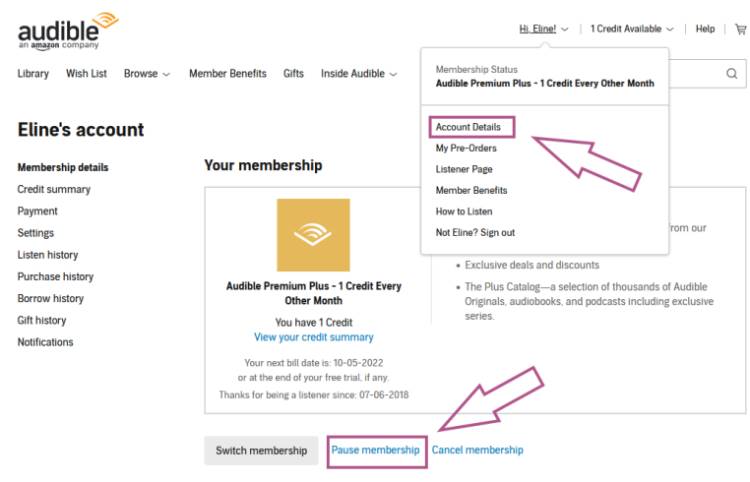
Navigate to the menu in the top right with “Hi, <your name>” and click on Account Details.
The Membership details page should be open on your screen now. Next to the “Switch Membership” button, you will see “Pause membership” in a simple blue font, as well as “Cancel membership”.
You will be asked to confirm that you want to place your membership on hold for up to three months. Once you confirm this by clicking “Continue,” your Audible subscription will be paused.
If you want to reactivate your subscription early, simply go to the same page to end the hold. Otherwise, your subscription will automatically activate, and you will be billed again after three months.
If you get an error notice or don’t see a link to pause your membership as per the image above, you can contact Audible customer service. But chances are you had put your membership on hold in the past 15 months and aren’t eligible again yet.
When to Pause Audible and When to Cancel
Pause if:
- You have unused credits you’re not ready to spend
- You need to stop payments NOW but want time to choose books
- You’re okay losing Plus access right away
Cancel if:
- You want more control over when your membership restarts
- You want to avoid surprise charges in 3 months
- You’ve already used your pause in the last 15 months
- You prefer less pressure and more flexibility
Personally, I prefer canceling because I feel I have more control over when my membership continues. I won’t have to remember to check in again.
What I have done in the past was pause my membership for three months to have more time to find audiobooks I’d want to spend my credits on. Then I’d put a reminder in my calendar to cancel the membership at the end of the pause after spending my leftover credits.
But honestly? Most of the time, I just take the plunge and cancel instead. That way, I can take all the time I need to catch up on the books in my Audible app, without finding an unexpected charge a couple of months later because I forgot that my account would reactivate.
If you’ve decided you’d rather cancel for now, check out my guide on how to cancel an Audible membership.
If you’re unhappy with your Audible purchases, here’s my guide on how to return Audible books!

Eline Blackman (pronouns: she/they) fell in love with books as a child – with being read to and reading herself. 11 years ago, she bought her first Audible book. It was love at first listen! An average of 200 audiobooks per year has become the new normal, and you will rarely see Eline without a wireless earbud. Romance and Fantasy are the go-to genres for this audiobook fan.